Pipelines scheduled automation
Our machine learning models need to adapt to evolving data patterns to maintain their accuracy and relevance. By scheduling our pipeline to run automatically every 10 minutes, we ensure that both the Stress Detection and Time to Failure Prediction models are continuously retrained with the latest battery data collected from the BMS application. This automated approach eliminates manual intervention, reduces the risk of model drift, and guarantees that our predictive models always reflect the most current battery behavior patterns.
Schedule recurring execution
Now let’s configure the pipeline to execute automatically:
-
Now, let’s go back to the Pipelines view in the left-hand menu.
-
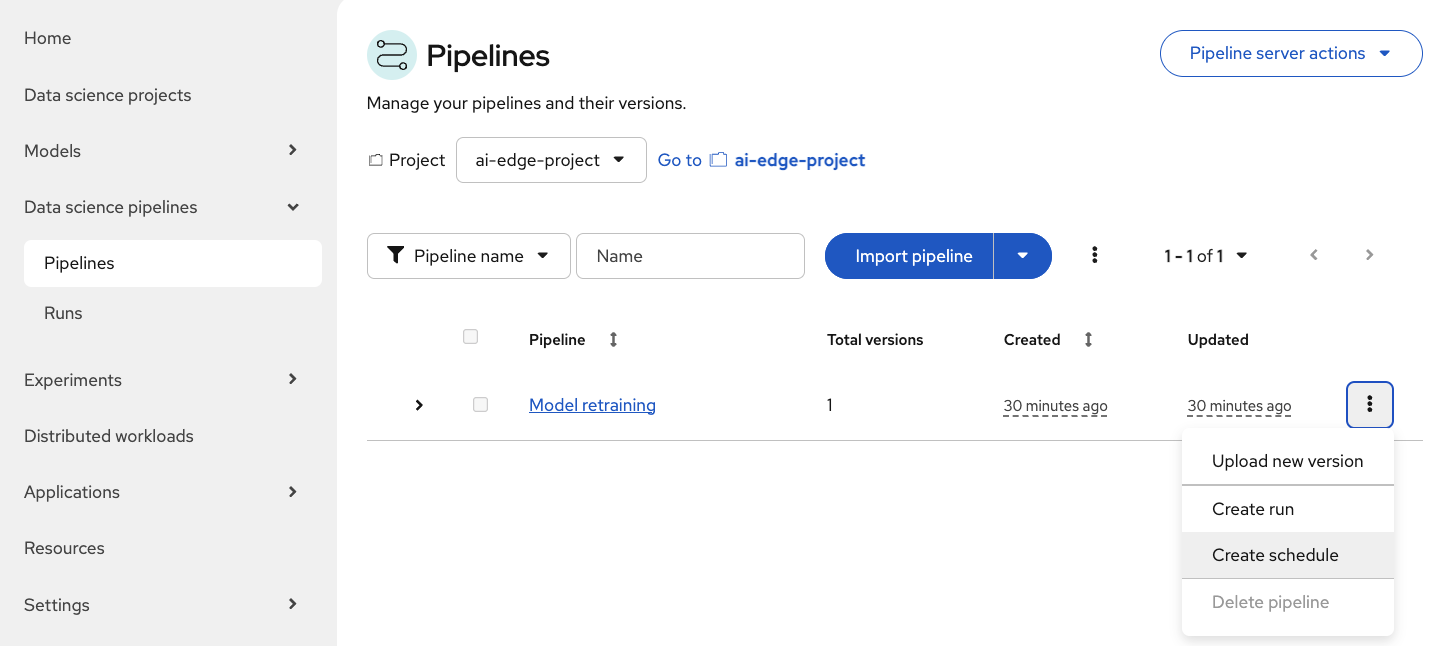
Click again on the Three dots at the far right of our Model Retraining pipeline.
-
Select Create schedule from the dropdown menu.
-
Fill in the schedule configuration form:
-
Name:
Scheduled run -
Trigger type: Select Periodic
-
Run every:
10minutes
-
-
Scroll down and verify that the Model Retraining pipeline has been automatically selected.
-
Check that the Parameters match the following values:
Parameter Value aws_access_key_id
minioaws_s3_bucket
inferenceaws_s3_endpoint
http://minio-microshift-vm.microshift-001.svc.cluster.local:30000aws_secret_access_key
minio123influxdb_bucket
bmsinfluxdb_org
redhatinfluxdb_token
admin_tokeninfluxdb_url
https://influx-db-microshift-001.{openshift_cluster_ingress_domain}/ -
When all parameters are correctly configured, click Create schedule.
The pipeline will now execute automatically every 10 minutes, continuously improving your models with fresh battery data. Come back after 10 minutes and the first scheduled run should be underway.